Showing posts with label Smartphone. Show all posts

Saturday, April 11, 2015

HTC one m7 Won't turn on or charging

I have bought the HTC one M7 a half year ago, it was working fine until I have upgraded to newest version of android in 2015 ( Android version 5) and then it was unable to allow the Facebook to display on highlight contents. it keep says that Let Htc sense access to Facebook when I tried to select the Facebook to be one of the content on highlights .
the battery seemed not saving much power and could not keep it for a whole day, is it possible that the battery drain or bad quality ?

the device turned off and never turned on back two months ago while I woke up in the morning, I suspected that the battery might use completely and i tried to charge it with the wall, but it had no led light and any reaction on the device. I googled and found a tip on youtube to restart the phone by pressing the home button and volume up for a while and then the device booted again and it was a great news for me.

the device turned off suddenly yesterday while I was shopping and checking the email , The battery was about 15% left so i thought , perhaps it was running out of battery and I charged it on the wall and waited and nothing to happen.

I tried to google again and tried the method that i used to and tried many methods to restart or reboot the phone by pressing power button, volume up and down . but no luck.

i think this time my device would seriously dead and it needs to be sent to repair, I will update my blog if there is any news or what exactly happened to my phone.

Friday, October 25, 2013

How to read Lao on Android smartphone

sabaidee, I have a LG P700 Smartphone and can't read Lao on mobile and internet browser
I have been researching a lot of websites on internet and finally found this way and I hope it is going to help you guys out!

 go to this website to download a software called Framaroot on this website
http://forum.xda-developers.com/showthread.php?t=2130276


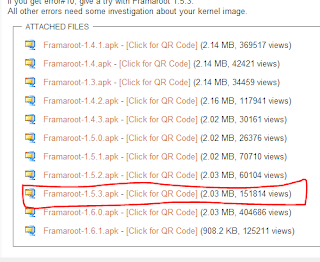
From that link you found the list of Framaroot version, as for my LG P700  I had selected on Framaroot 1.5.3 .apk.  (above picture)

you can download that application by using QR CODE SCAN

when you start to download this application, your system might ask you to change a setting  for accepting the Unknown source application. after you completely downloaded. you can see framaroot icon on your mobile


select the framaroot icon and start to installsuperSU


Select the install Supersu and then select Aragorn or Gandalf. I had selected Gandalf and if it works for your mobile which will success installed. after successfully installed, your phone will be restarted and then done.
Next step, make sure your phone has Lao font installed, I suggest you to install Laodroid for Galaxy, you can search on google store and install it for free.


Next step, it is time to install Lao font on your mobile. at first you can install the application called Ifont


after completed, you can go on to install Lao font by selecting Laodroid.
your phone will be rebooted and then done. Now, you can read Lao on your mobile or any website browsers.
Let's try, I hope your mobile can work as mine, if your phone works and can read Lao. I will show you how to install the Lao keyboard on android and type Lao on your android mobile. please give me some comments if you have any problems or it works with your phone.

Follow me on Facebook

Contact me

    4000岛,老挝占巴色省。湄公河的最多岛

    4000岛,老挝占巴色省。湄公河的最多岛
    你要放松,要在那里看当地如何生活?来这里美丽岛,美丽的老挝,美丽的湄公河。

    Muang Kao 寺庙

    Muang Kao 寺庙
    Muang Kao 寺庙位于他曲市,甘蒙省,离城市 6公里。